Saturday, August 18

New GTD form for Outlook Tasks

It's been a while now since I thought to submit another project on the net. I worked for a while on a way to create a GTD based form for outlook tasks. The final published form, found at the bottom of this post has a few advantages over the default task form in outlook.
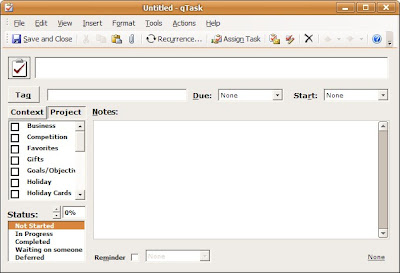
1st off, there is a larger section for the subject, followed with start and due dates with drop downs containing common weekday (today, tomorrow, next week, next month, and all the days of the week).

2nd, there is a date displayed in the bottom right hand corner to give you an idea when the opened task was last modified (helps to identify old or forgotten tasks)

3rd, the status is adjusted with a spinner control stepping up 10% at a time. This is more useful with a mod to the Task view mode, but I will discuss that later.

The mod I am most proud of is the Context / Project Buttons. The master category list in Outlook is pulled and all categories with !, @, or # in the beginning are placed in Contexts, all others are placed in Projects. Toggle back and forth between the two tabs, and select the contexts and projects suitable for the task. Just add new categories in your Master Category List if you require additional contexts or projects.

To Install

To install the ODF, double click on it, and select Tools> Publish As, and Save it as something memorable. Then, whenever you have it installed, just go to the Tasks tab, and select Action > New qTask

Some notes:

This build is currently set up currently for 2003, let me know if you need other builds.

I have auto-sized the form, so either modify the size defined in the VB script of the form or only have one toolbar at the top as seen in the picture.

Download qTask

Friday, May 11

Quick Hotkeys in Evernote

Ever since I have started Evernote, I have been surprised to see that the developers see no need to add a stamp dialog hotkey. I don't know how many times I sat with both hands on the keyboard writing something when I realize I want to stamp it and find that I need to go back to the mouse.

This is a fix in AHK (autohotkey). The code is listed below. It is comprised of 4 major features.

1. Launch or open evernote on pressing Ctrl + Shift + E. If its open, it will pop up. If its not, it will be launched. Executable needs to be in the Program Files\Evernote directory.
2. Minimize Evernote on ESC...
3. Maximize or restore Evernote window by pressing F10
4. and Finally, stamp category dialog on last entry in Evernote. This should work with whatever active note you are working on. You can also click on the note in the note list and then use the hotkey. I defaulted the hotkey to Alt + G to activate. I have found that this does not work correctly when there are many form based templates in use. If working off of clippings or text based entries there should be no problem though.

Feel free to change or modify any of these to make them work with your command structure.

AHK can be found at http://www.autohotkey.com if you feel the desire.

If you just want to try the executable, download it here.


The code is as follows


;Persistant


;Evernote

; Launch or Open Evernote
+^e::
IfWinExist, ahk_class ENMainFrame
WinActivate
Else
Run Evernote.exe, %A_ProgramFiles%\Evernote\
Return

;Minimize Evernote on Escape
$ESC::
IfWinActive, ahk_class ahk_class ENMainFrame
WinMinimize
Else
Send, {ESC}
Return

;Fullscreen Evernote on F9
$F10::
IfWinActive, ahk_class ahk_class ENMainFrame
{
Winget, Restore, MinMax
If Restore = 1
WinRestore
Else
WinMaximize
}
Else
Send, {F9}
Return

;Evernote Category on Last Entry
!g::
IfWinExist ahk_class ENMainFrame
{
ControlGetFocus, WhichControl, ahk_class ENMainFrame
IfInString, WhichControl, Html
{
StringMid, Code, WhichControl,11
ControlClick, ENNoteBar%Code%, ahk_class ENMainFrame, , Left, 1, X10 Y10 NA
sleep 100
IfWinNotExist, ahk_class #32770
ControlClick, x%XX% Y%YY% , ahk_class ENMainFrame, , Left, 1, POS NA
}
IfInString, WhichControl, List
{
Send ^{TAB}
ControlGetFocus, WhichControl, ahk_class ENMainFrame
ControlGetPos, XX, YY, WID, HI, %WhichControl%, ahk_class ENMainFrame
XX := XX + 31
YY := YY + 31
ControlClick, x%XX% Y%YY% , ahk_class ENMainFrame, , Left, 1, POS NA
sleep 100
IfWinNotExist, ahk_class #32770
ControlClick, x%XX% Y%YY% , ahk_class ENMainFrame, , Left, 1, POS NA
}
}
Else
Send !g
Return