New GTD form for Outlook Tasks
It's been a while now since I thought to submit another project on the net. I worked for a while on a way to create a GTD based form for outlook tasks. The final published form, found at the bottom of this post has a few advantages over the default task form in outlook.
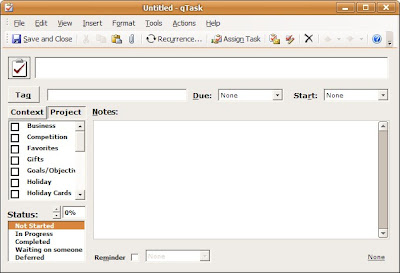
1st off, there is a larger section for the subject, followed with start and due dates with drop downs containing common weekday (today, tomorrow, next week, next month, and all the days of the week).
2nd, there is a date displayed in the bottom right hand corner to give you an idea when the opened task was last modified (helps to identify old or forgotten tasks)
3rd, the status is adjusted with a spinner control stepping up 10% at a time. This is more useful with a mod to the Task view mode, but I will discuss that later.
The mod I am most proud of is the Context / Project Buttons. The master category list in Outlook is pulled and all categories with !, @, or # in the beginning are placed in Contexts, all others are placed in Projects. Toggle back and forth between the two tabs, and select the contexts and projects suitable for the task. Just add new categories in your Master Category List if you require additional contexts or projects.
To Install
To install the ODF, double click on it, and select Tools> Publish As, and Save it as something memorable. Then, whenever you have it installed, just go to the Tasks tab, and select Action > New qTaskSome notes:
This build is currently set up currently for 2003, let me know if you need other builds.
I have auto-sized the form, so either modify the size defined in the VB script of the form or only have one toolbar at the top as seen in the picture.
